> For the complete documentation index, see [llms.txt](https://guides.noloco.io/llms.txt). Markdown versions of documentation pages are available by appending `.md` to page URLs; this page is available as [Markdown](https://guides.noloco.io/nola/memory.md).
# Nola's Memory
How Nola remembers your preferences and app details across conversations
Nola remembers things across your conversations. Beyond the [context she holds within a single chat](/nola/getting-started-with-nola.md#nolas-context), Nola keeps a longer-term **memory** of your preferences and the details that matter for your app — so you don't have to explain them again every time you start a new conversation.
## What Nola remembers
Memory is for the durable things that shape how you want Nola to work, such as:
* **Preferences** — "always use British date formats", "keep field names in Title Case", "prefer concise summaries"
* **Terminology** — "we call them *clients*, not *customers*"
* **App conventions** — "our fiscal year starts in April", "every project must be linked to an account"
* **Working style** — "check with me before deleting anything"
Nola draws on these memories automatically in future conversations, so her work stays consistent with how your team operates.
## Asking Nola to remember something
The simplest way to add a memory is to tell Nola directly:
* "Remember that our financial year starts in April."
* "From now on, always use our brand colours on any page you build."
* "Keep in mind that only admins should ever see salary fields."
Nola will also pick up on durable preferences as you work and keep them for next time. Memory is best for things that stay true — one-off instructions for the task at hand don't need to be remembered.
## Viewing and managing memories
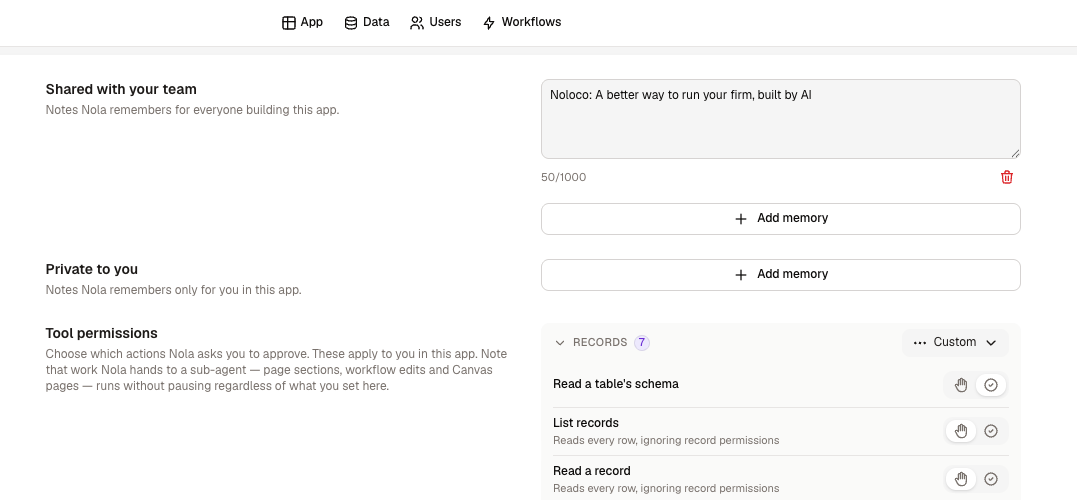
You're always in control of what Nola remembers. In Nola's **settings** you'll find a memory section where you can:
* **Review** everything Nola currently remembers
* **Edit** a memory whose details have changed
* **Delete** anything that's no longer relevant
If Nola ever behaves in a way you didn't expect, the memory section is a good first place to look — a stale preference is easy to update or remove.
Reviewing and managing what Nola remembers
{% hint style="info" %}
Memory is about *preferences and context*, not your records. Nola remembering "we call them clients" doesn't change any data — it just shapes how she talks and builds. Your actual app data always lives in your [tables](/data/collections.md).
{% endhint %}
## Related
{% content-ref url="/pages/0XtlO9qufGMLCf5IYpLT" %}
[Getting Started with Nola](/nola/getting-started-with-nola.md)
{% endcontent-ref %}
{% content-ref url="/pages/0647kJQ2WZkWSoFTDaXF" %}
[Tips and Best Practices](/nola/tips-and-best-practices.md)
{% endcontent-ref %}
---
# Agent Instructions
This documentation is published with GitBook. GitBook is the documentation platform designed so that both humans and AI agents can read, navigate, and reason over technical content effectively. Learn more at gitbook.com.
## Querying This Documentation
If you need additional information that is not directly available in this page, you can query the documentation dynamically by asking a question.
Perform an HTTP GET request on the current page URL with the `ask` query parameter, and the optional `goal` query parameter:
```
GET https://guides.noloco.io/nola/memory.md?ask=&goal=
```
`ask` is the immediate question: it should be specific, self-contained, and written in natural language.
`goal` is optional and describes the broader end goal you are ultimately trying to accomplish on behalf of the user. GitBook uses it to tailor the answer towards what is most useful for that goal.
The response will contain a direct answer to the question and relevant excerpts and sources from the documentation.
Use this mechanism when the answer is not explicitly present in the current page, you need clarification or additional context, or you want to retrieve related documentation sections.